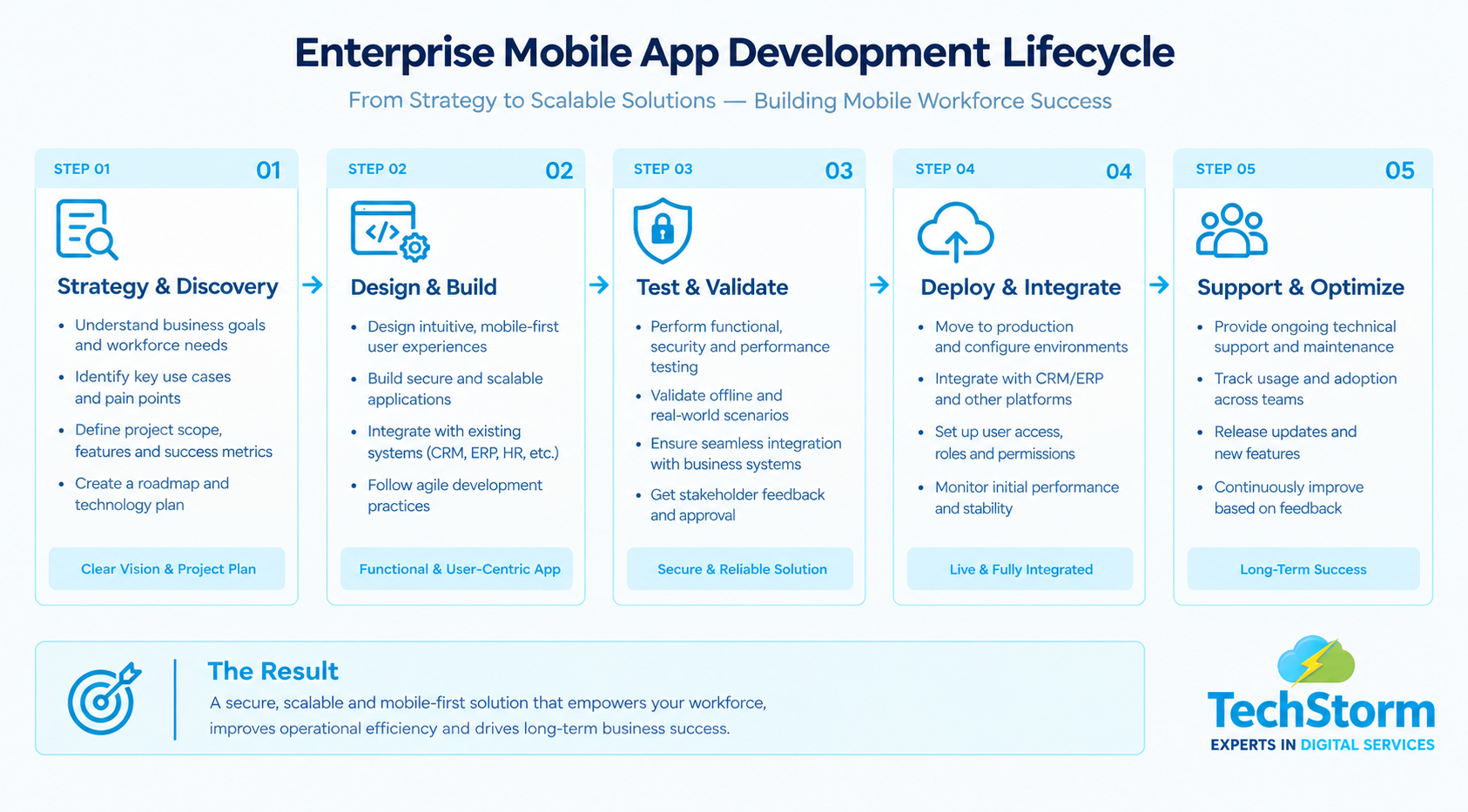
Enterprise Mobile App Development – Key Highlights
- Core objective: Build mobile applications around how employees, field teams, and business operations actually work.
- Key priorities: Offline access, security, system integration, usability, and mobile-first workflows.
- Typical workforce features: Scheduling, task tracking, digital forms, location tracking, notifications, messaging, and reporting.
- Integration focus: Connect mobile applications with CRM, ERP, HR, finance, and legacy business systems.
Enterprise mobile app development is the process of designing, building, and maintaining mobile applications for a company's own employees, field teams, or business operations, rather than for public app store users. If you are evaluating enterprise mobility solutions , you are likely trying to solve a real operational problem: staff who work away from a desk, data spread across disconnected systems, or manual processes that slow down service delivery.
This guide covers what enterprise mobile app development actually involves, the features that separate a mobile-first enterprise solution from a basic app, what custom mobile application services typically include, and how to choose a development partner that delivers results rather than just code.
Key Takeaways
- Enterprise mobile app development builds internal-facing apps for employees and field teams, not public consumers.
- Mobile-first enterprise solutions prioritize offline access, security, and integration with existing business systems from day one.
- Mobile workforce management solutions typically include scheduling, real-time tracking, digital forms, and team communication.
- Custom mobile application services can range from a single department app to a full mobile-first rebuild of core operations.
- The right development partner should show experience with system integration and ongoing support, not just app design.
What Is Enterprise Mobile App Development?
Enterprise mobile app development builds software for a defined group of users, typically employees, field staff, contractors, or business partners, rather than the general public.
A consumer app is judged on downloads, ratings, and how well it attracts new users. An enterprise app is judged on adoption inside the business, time saved on a task, and how well it fits into workflows that already exist.
These apps usually need to connect to systems the business already runs, such as a CRM, an ERP platform, an HR system, or finance software. That integration requirement, more than the interface itself, is what tends to make enterprise mobile app development a different discipline from building a typical app.
Why Mobile-First Enterprise Solutions Matter in 2026
More teams now work outside a single office: field service engineers, healthcare and community staff, delivery and logistics crews, and sales teams who spend most of their day on site rather than at a desk.
These employees expect the same smooth mobile experience at work that they get from the apps they use every day, and a business that still relies on paper forms or a desktop-only system slows down its own staff.
A mobile-first enterprise solution is designed around a phone or tablet as the primary device from the start. That affects navigation, how data is entered in the field, and, most importantly, whether the app still works when a signal drops.
Retrofitting a desktop system onto a smaller screen is not the same thing, and it usually shows.
Core Features Every Mobile Workforce Management Solution Needs
- Offline access with automatic sync: For staff working in areas with weak or no connectivity.
- Role-based access and single sign-on: So the right people see the right data and nothing more.
- Real-time scheduling, location, and task tracking: For teams on the move.
- Digital forms and reporting: Replace paper-based processes and reduce data entry errors.
- Push notifications and in-app messaging: So field teams stay connected without constant phone calls.
- Integration with existing business systems: Most enterprises operate on CRM, ERP, or finance platforms long before a mobile app enters the picture.
Integration is often the hardest part of the build, which is why dedicated MuleSoft integration services matter. They can connect a new mobile app to legacy and on-premises systems without disrupting the data teams already depend on.
- Built-in analytics and usage dashboards: So IT and management can see adoption and act on it.
Consumer App vs. Enterprise Mobile App
The table below sums up why an enterprise build is judged by different standards than a typical consumer app.
| Dimension | Consumer App | Enterprise Mobile App |
|---|---|---|
| Primary user | General public | Employees, field staff, and partners |
| Success metric | Downloads, ratings, engagement | Adoption rate, time saved, error reduction |
| Security requirements | Standard app store review | Role-based access, SSO, compliance, MDM |
| Integration needs | Usually standalone | Connects to CRM, ERP, HR, and finance systems |
| Update cycle | Public app store release cycle | Controlled internal rollout tied to business change |
What Custom Mobile Application Services Typically Include
Businesses tend to ask for one of a few things: a single department app, such as a field inspection or delivery tool; a full mobile workforce management suite covering scheduling and reporting; a rebuild of an existing app that no longer fits current systems; or a broader mobile-first overhaul of a core business process.
This rarely happens in isolation. A new workforce app is often one part of a wider digital product development effort that also touches web portals, reporting, or automation elsewhere in the business, which is worth planning for even if the mobile app is the first piece being built.
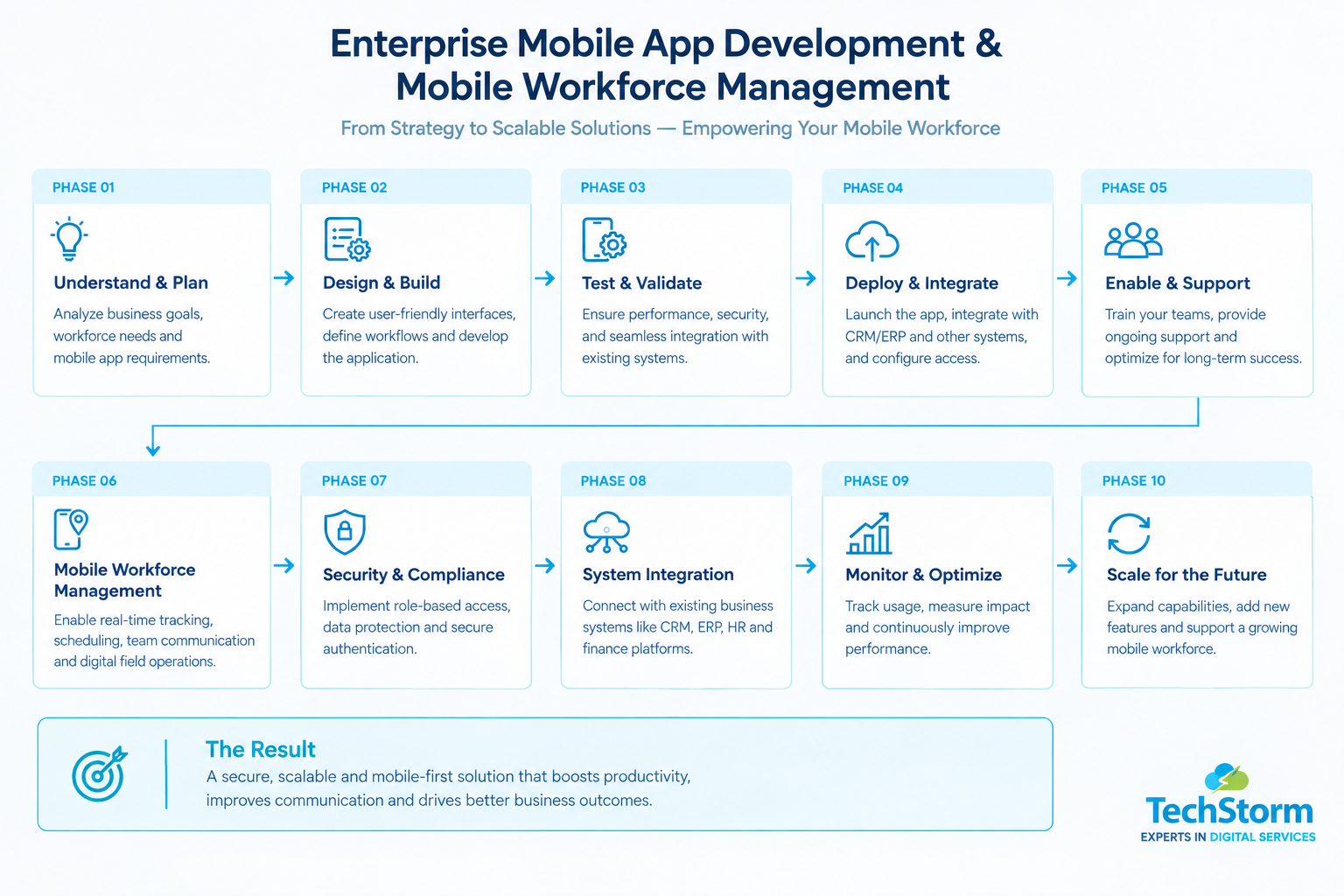
How to Choose the Right Enterprise Mobile App Development Partner
The right partner should understand your business processes, existing systems, field workflows, security requirements, and long-term support needs rather than focusing only on building the application itself.
- Ask for evidence of enterprise app delivery, ideally in a similar industry, not just consumer app portfolio pieces.
- Check integration experience with the systems you already run, such as your CRM, ERP, accounting, or HR platform.
- Confirm how they handle security, access control, and data compliance before any development starts.
- Ask what post-launch support looks like once staff are relying on the app daily.
- Look for a defined delivery process rather than an open-ended build with no clear milestones.
The Enterprise Mobile App Development Process, Step by Step
- Discovery and requirements: Mapping the workflows, systems, and user roles the app needs to support.
- UX and technical design: Wireframes and architecture built around how field or desk-based staff actually work.
- Development and integration: Building the app and connecting it to existing business systems.
- Testing: Functional, security, and real-world usability testing, including offline scenarios.
- Deployment and training: Rolling the app out to staff with clear onboarding.
- Ongoing support: Monitoring adoption, fixing issues, and adding features as the business changes.
What Makes an Enterprise Mobile App Successful?
Enterprise mobile applications succeed when they solve measurable operational problems rather than simply putting an existing desktop process onto a mobile screen.
- High employee adoption: Staff should find the mobile workflow easier than the previous process.
- Reliable offline functionality: Field workers should be able to continue working when connectivity is unavailable.
- Strong system integration: Data should flow reliably between the mobile application and existing business platforms.
- Security by design: Access controls, authentication, device management, and compliance should be considered from the beginning.
- Measurable business outcomes: Organisations should track improvements such as reduced administration, fewer errors, faster service delivery, and higher workforce productivity.
Common Enterprise Mobile App Development Mistakes to Avoid
- Building before understanding the workflow: Starting development without mapping how employees actually work can create an application that looks good but does not solve the real problem.
- Ignoring offline requirements: Field applications can become unusable if they depend completely on a constant internet connection.
- Treating integration as an afterthought: Connecting CRM, ERP, HR, finance, or legacy systems after the application is built can increase cost and complexity.
- Underestimating security: Enterprise applications often handle sensitive operational and customer data and therefore require stronger controls than many consumer applications.
- Focusing only on launch: Enterprise applications need monitoring, maintenance, security updates, and continuous improvements after deployment.
Final Thoughts
Enterprise mobile app development only pays off when it is built around how your teams actually work, not as a smaller version of a desktop tool or a copy of a consumer app.
Whether you need a single mobile workforce management solution or a full mobile-first rebuild of a core process, the right custom mobile application services partner should start with your workflows and existing systems, not a generic template.
Talk to the Techstorm Team About Your Mobile App
If you are considering an enterprise mobile application, mobile workforce management solution, or mobile-first transformation, the best place to start is with your current workflows, systems, and business goals. Get in touch with the Techstorm team to talk through what enterprise mobile app development could look like for your business.