E-Commerce CRM & ERP Integration – Key Highlights
- Core objective: Connect your online store with CRM, accounting/ERP and fulfilment systems.
- Data to sync: Orders, customer records, inventory, payments/invoices, and fulfilment status.
- Integration methods: Native connectors, middleware/iPaaS such as MuleSoft, or custom API integration.
- Project focus: Data mapping, sync direction, edge cases, testing, parallel running, monitoring and ongoing support.
Connect your online store to Salesforce, accounting and fulfilment tools with proven integration methods, real costs and a step-by-step project plan.
You integrate an online store with CRM and accounting systems by syncing four data types — orders, customers, inventory and invoices — either through a native app connector, a middleware/iPaaS platform like MuleSoft, or a custom API build. Most growing stores start with a connector, then move to middleware once order volume or the number of connected systems makes manual fixes unmanageable. Setup typically runs from a few weeks for a simple connector to two to three months for a full e-commerce integration project involving Salesforce and accounting software together.
If you run an online store and your team is still exporting orders to a spreadsheet, manually re-entering invoices, or double-checking stock across two systems before confirming a sale, this guide walks through exactly how to fix that, what it costs, and how to avoid the mistakes that cause most integration projects to break down within the first year.
What Is E-Commerce CRM and ERP Integration?
E-commerce CRM and ERP integration is the process of connecting your online store's platform (Shopify, WooCommerce, Magento or a custom build) to the systems that run the rest of your business: your CRM for customer and sales data, your accounting or ERP software for invoicing and stock control, and often your fulfilment or logistics tools.
This is different from general "e-commerce integration," which can also include things like payment gateways or shipping carrier plugins. CRM and ERP integration specifically deals with business-critical records: who your customers are, what they bought, what you owe in tax and stock, and what still needs to ship. Get this wrong and the damage shows up in your accounts and your customer relationships, not just on your website.
Why Disconnected Systems Cost You Sales and Time
Most stores don't plan to run on disconnected systems. It happens gradually: the store launches on Shopify, the accounts team keeps using Sage or Xero because that's what the bookkeeper knows, and sales data lives in a CRM nobody remembers to update. Each system works fine on its own. The problem is what happens between them.
A few patterns show up again and again in stores that haven't integrated their systems:
- Stock shown as available on the website has already sold out in the warehouse system, so orders get cancelled after the customer has paid.
- Finance re-keys online orders into the accounting system by hand, which is slow and introduces errors in tax and invoicing.
- Sales and support teams can't see a customer's order history without logging into the store platform separately, so response times suffer.
- Promotions and loyalty offers can't be personalised because purchase history never reaches the CRM.
None of these are platform problems. They're integration problems, and they get worse as order volume grows rather than better.
What Data Should Sync Between Your Store and Your Business Systems
Before choosing a method, it helps to know exactly what needs to move, and in which direction. Most integration projects fail not because the technology doesn't work, but because nobody mapped this out first.
| Data type | Starts in | Needs to reach | What breaks if it doesn't sync |
|---|---|---|---|
| Orders | Store platform | CRM, accounting/ERP | Manual re-entry, invoicing delays, tax errors |
| Customer records | Store platform or CRM | Both systems, kept in sync | Duplicate profiles, inconsistent service history |
| Inventory levels | Warehouse/ERP | Store platform | Overselling, cancelled orders, refunds |
| Payments and invoices | Store platform | Accounting/ERP | Reconciliation errors, VAT/tax reporting issues |
| Shipping and fulfilment status | Fulfilment system | Store platform, CRM | Customers left without order updates |
Three Ways to Connect Your Store to CRM and Accounting Software
There is no single "correct" way to integrate. The right approach depends on how many systems you're connecting, how much data moves each day, and how much ongoing maintenance you're willing to take on in-house.
| Approach | Best for | Setup effort | Ongoing maintenance |
|---|---|---|---|
| Native app or plugin connector | One store platform to one system (e.g. Shopify to a CRM) | Low, often days | Low, but limited flexibility |
| Middleware / iPaaS (e.g. MuleSoft) | Multiple systems, complex logic, growing businesses | Medium to high | Low once built, easy to extend |
| Custom API integration | Highly specific workflows or legacy systems | High | Higher, needs a developer on call |
Native connectors are the fastest way to get started, but they tend to break down once you add a third or fourth system, because each connector only knows how to talk to the platforms it was built for. A MuleSoft integration sits in the middle instead, so your store, CRM and accounting software all talk through one layer that you can update without rebuilding every connection from scratch. Custom API work makes sense when a system is old enough, or specific enough, that no existing connector or middleware template covers it.
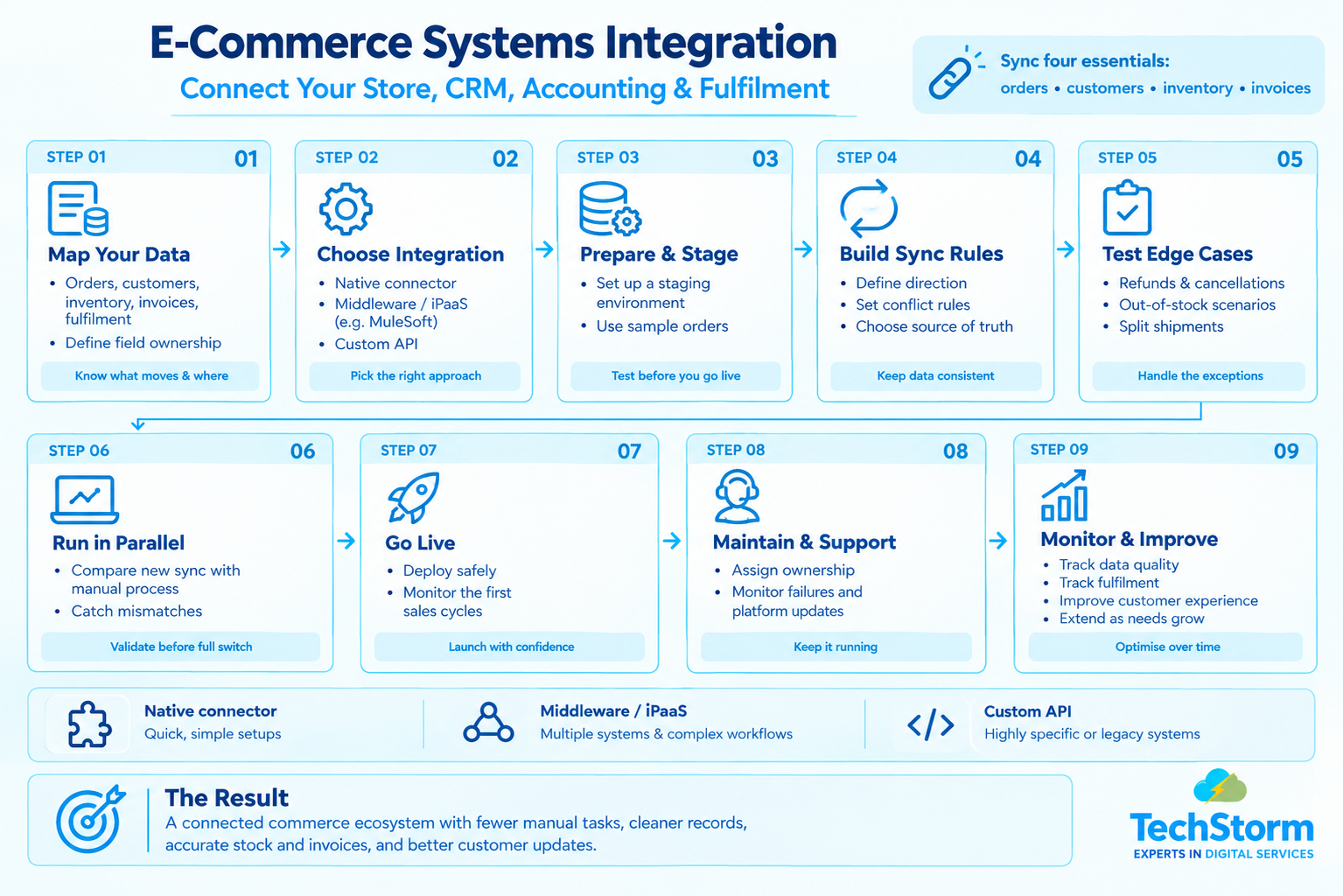
Step by Step: How an E-Commerce to CRM/ERP Integration Project Runs
- Map the data. Confirm exactly which fields move between which systems, and who owns each one if there's a conflict.
- Choose the integration method. Match the approach (connector, middleware, custom build) to the number of systems and the complexity of the workflow, not just the smallest upfront cost.
- Set up a staging environment. Test the sync with sample orders before it touches live customer data.
- Build and test the sync rules. This includes what happens on edge cases: partial refunds, cancelled orders, out-of-stock items and split shipments.
- Run a parallel period. Keep the old manual process running alongside the new integration for a short window to catch mismatches early.
- Go live and monitor. Watch the first few weeks closely, since most sync errors surface in the first real sales cycle, not in testing.
A Practical Example: Why Sync Direction Matters
Say a store sells the same product through its website and a physical location. If inventory only syncs one way, from the ERP to the website, an in-store sale won't reduce the stock count shown online. The website keeps selling a product that's already gone, and the store ends up cancelling orders and issuing refunds after the fact, which damages customer trust far more than simply showing "out of stock" would have.
The fix isn't a better plugin. It's designing the sync to run both ways, with clear rules for which system "wins" when two sales happen at nearly the same time. This kind of two-way, rules-based sync is exactly what gets missed when a business integrates its systems with an off-the-shelf connector alone, and it's usually the moment a growing store needs a properly built Salesforce integration rather than a quick plugin fix.
E-Commerce Integration in Practice
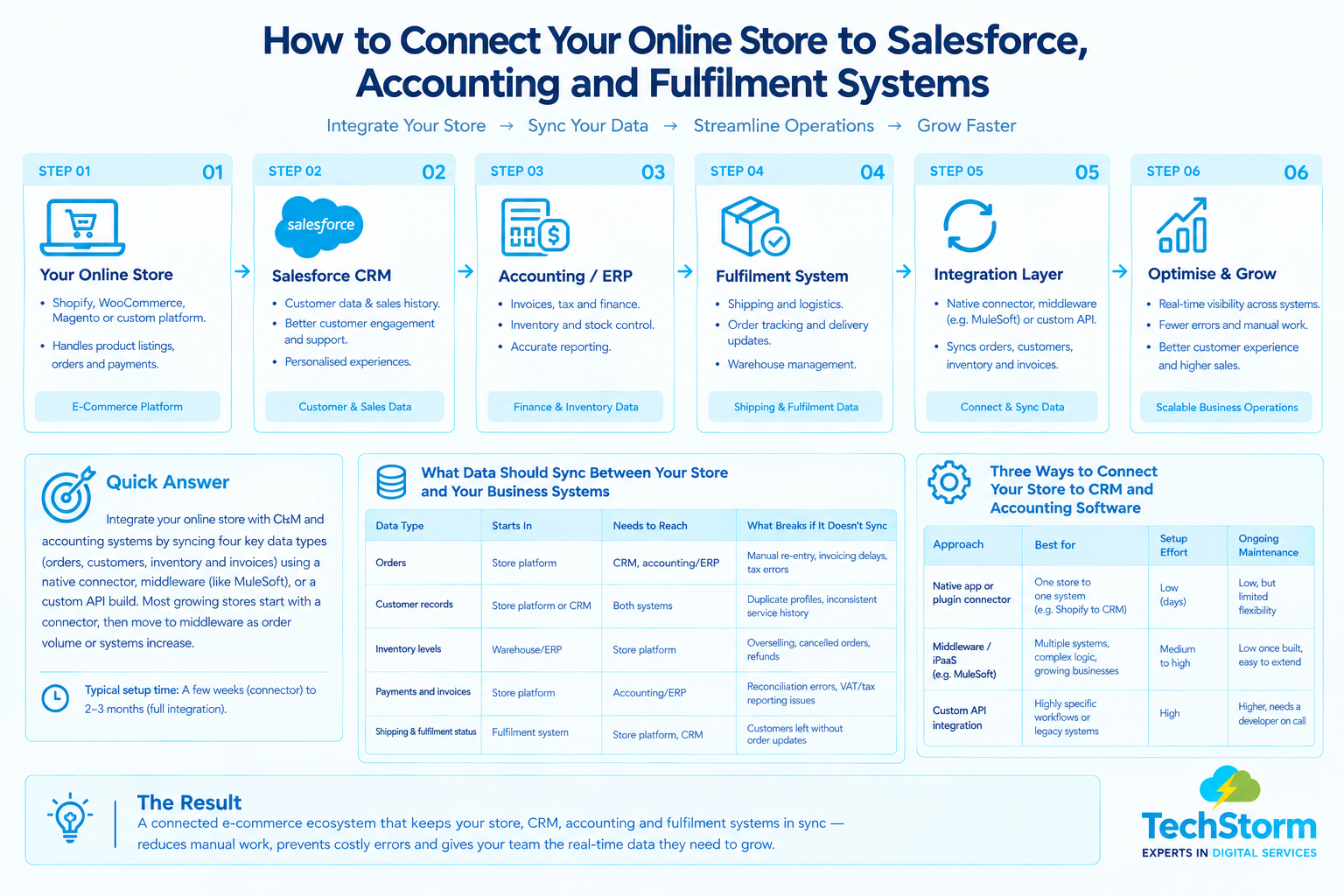
A reliable integration connects the store, CRM, accounting/ERP and fulfilment systems with clearly defined data ownership and sync rules. The goal is not simply to move data between applications, but to make sure each business process has the information it needs at the right point in the customer and order lifecycle.
This becomes especially important when order volume grows or when several systems need to work together. A central integration layer can make the architecture easier to monitor and extend as additional channels, applications or workflows are introduced.
Common Mistakes That Break E-Commerce Integrations
- Skipping the data mapping step. Teams jump straight to building the connection without agreeing what each field means in each system, which causes silent errors later.
- Treating it as a one-time project. Store platforms, CRMs and accounting software all update independently, so an integration needs someone responsible for maintaining it.
- Ignoring edge cases. Refunds, partial shipments and cancelled orders are where most syncs break, yet they're often untested before launch.
- No single source of truth. If both systems can edit the same record, you need a clear rule for which one wins, or data will drift apart within weeks.
- Choosing the cheapest connector for a complex business. A basic plugin that works for one system quickly becomes a liability once a third or fourth tool joins the stack.
How to Choose an Integration Partner
- Ask for examples of similar integrations they've built, not just platforms they're "familiar with."
- Confirm they'll document the data mapping and sync rules, not just hand over a working connection with no notes.
- Check whether they support the specific CRM, accounting software and store platform combination you use today, and can extend it if you add another system later.
- Ask how they handle failures: what happens, and who gets notified, if a sync fails at 2am on a Friday during a sale.
- Make sure ongoing support is part of the plan, not just the initial build.
Ready to Stop Reconciling Orders by Hand?
Ready to stop reconciling orders by hand? Book a free e-commerce integration consultation and we'll map out exactly what needs to connect.