Quick Answer & Key Timelines
- Standard cloud accounting implementation: 1,500 to 6,000 euro, 3 to 8 weeks.
- Multi-entity or multi-currency implementation: 5,000 to 15,000 euro, 8 to 14 weeks.
- Accounting automation add-ons: typically 500 to 3,000 euro per automated workflow, depending on complexity.
- Migration from spreadsheets or older desktop software: usually adds 1 to 3 weeks for data cleanup before go-live.
- Cloud financial management is a process change, not just a software swap. Skipping process redesign is the most common reason implementations under-deliver.
Cloud accounting software implementation is the process of moving a business's bookkeeping and financial reporting onto a cloud platform such as Aedon, Xero, QuickBooks Online, or Sage, including chart of accounts setup, bank feed connections, historical data migration, and staff training. A standard implementation typically costs between 1,500 and 6,000 euro and takes 3 to 8 weeks, with cost rising for multi-entity businesses or heavy automation. This guide covers what implementation actually involves, what Aedon accounting cloud services include, and which accounting tasks can genuinely be automated.
What Is Cloud Accounting Software Implementation?
Implementation covers more than installing a subscription. A proper cloud accounting software implementation includes:
- Chart of accounts setup: structured so reports are useful from day one, not copied blindly from a previous system.
- Bank and payment feed connections: so transactions import automatically instead of being entered by hand.
- Historical data migration: moving prior-year records across cleanly, with balances that reconcile.
- User roles and permissions: so staff, bookkeepers, and accountants see only what they need to.
- Tax and VAT configuration: set up correctly for Irish, UK, or EU obligations depending on where the business operates.
- Staff training: the platform only pays off if the team actually uses it correctly day to day.
Our team handles this as part of our cloud accounting software implementation services, working alongside your existing accountant or bookkeeper rather than replacing that relationship.
Aedon Accounting Cloud Services: What Implementation Involves
Aedon is one of the cloud accounting platforms we implement for clients, alongside Xero, QuickBooks Online, and Sage. Aedon accounting cloud services generally follow the same core implementation path as any cloud platform: initial setup and configuration, connecting bank feeds and payment processors, migrating existing financial data, configuring tax settings for your market, and training your team. Where Aedon implementation differs from platform to platform is in the specific automation rules, reporting templates, and integrations available, so it is worth confirming directly with your implementation partner which features are relevant to your business before committing to a setup plan.
If your business is evaluating Aedon against another platform, the decision usually comes down to which integrations you already rely on (payroll, inventory, e-commerce) and how much automation and multi-entity reporting you need, not the accounting basics, which are broadly similar across established cloud platforms.
Cloud Financial Management Solutions: Beyond Just Accounting Software
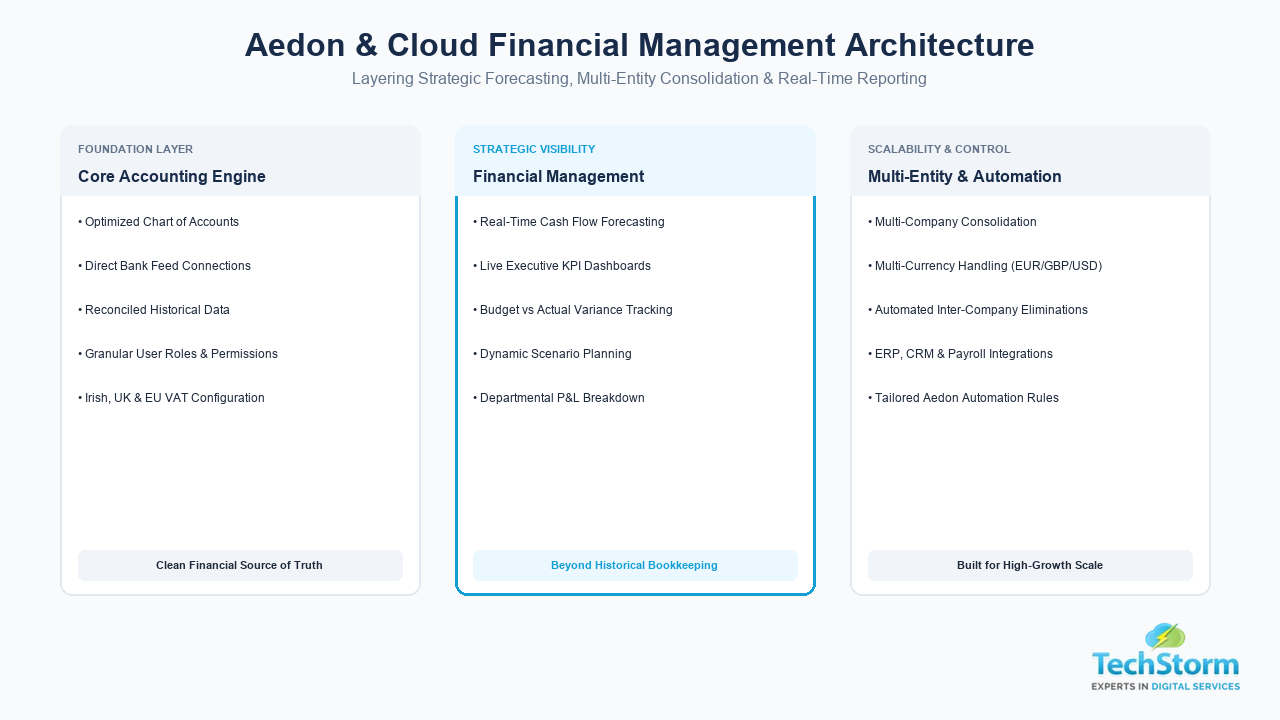
Cloud financial management is broader than day-to-day bookkeeping. It typically layers these capabilities on top of the core accounting platform:
- Cash flow forecasting: projecting incoming and outgoing cash based on real transaction history, not just a spreadsheet estimate.
- Multi-entity consolidation: combining reports across multiple companies or branches into one view.
- Budgeting and variance tracking: comparing actual spend against budget automatically, month to month.
- Real-time dashboards: giving owners and finance teams live visibility instead of waiting for month-end reports.
- Payroll and inventory integration: so financial reporting reflects the full business, not accounting in isolation.
Platform Considerations
| Consideration | What to check | Why it matters |
|---|---|---|
| Automation depth | Which workflows can be rule-based versus manual | Determines how much admin time is actually saved |
| Integrations | Payroll, inventory, CRM, e-commerce connections available | Avoids double data entry between systems |
| Multi-currency and multi-entity | Native support versus add-on apps | Affects cost and reporting accuracy for growing businesses |
| Support and training | Onboarding resources and implementation partner availability | Adoption fails without proper staff training |
Accounting Automation Services: What Actually Gets Automated
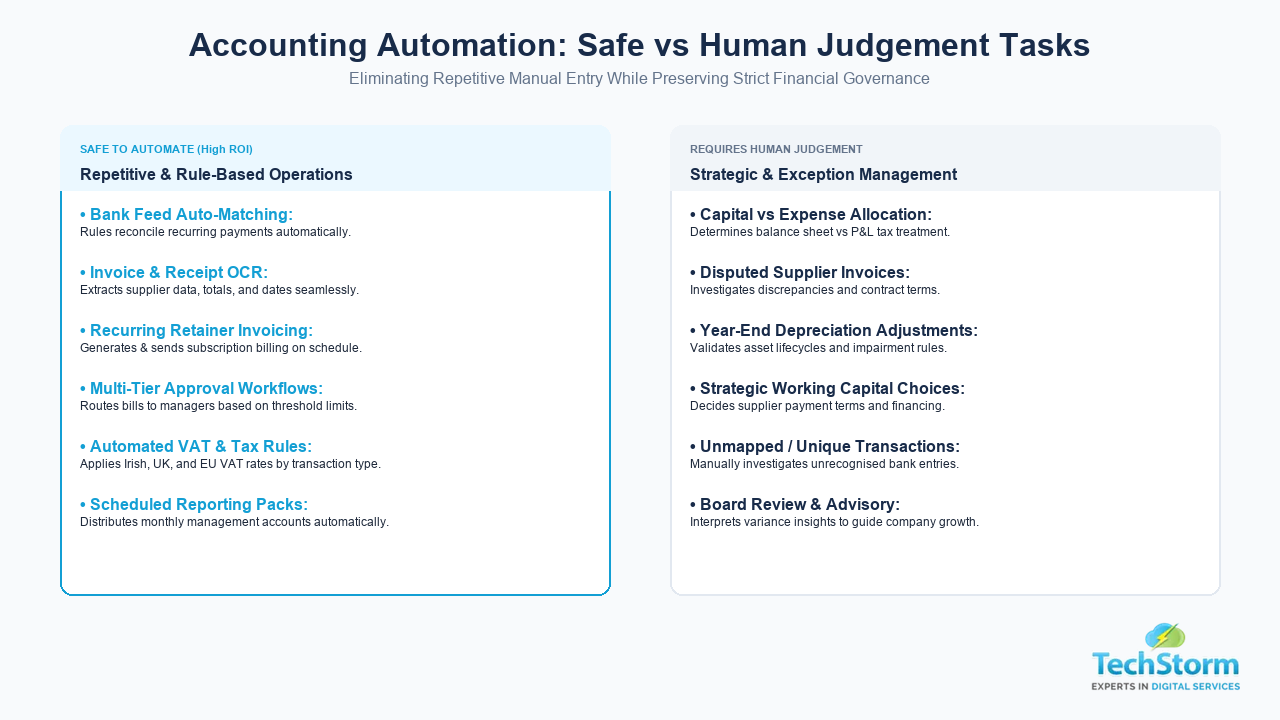
Automation should remove repetitive manual entry, not replace financial judgement. The tasks that are genuinely safe and effective to automate are:
- Bank feed reconciliation: matching transactions automatically against invoices and bills, as part of our accounting automation services.
- Invoice and receipt capture: using OCR to read and code expenses instead of manual data entry.
- Recurring invoice generation: for retainer clients or subscription billing.
- Approval workflows: routing bills and payments to the right person automatically before they are paid.
- VAT and tax calculations: applied automatically based on transaction type and jurisdiction.
- Scheduled financial reporting: so monthly reports are generated and distributed without manual pulling.
Step by Step: How a Cloud Accounting Implementation Project Runs
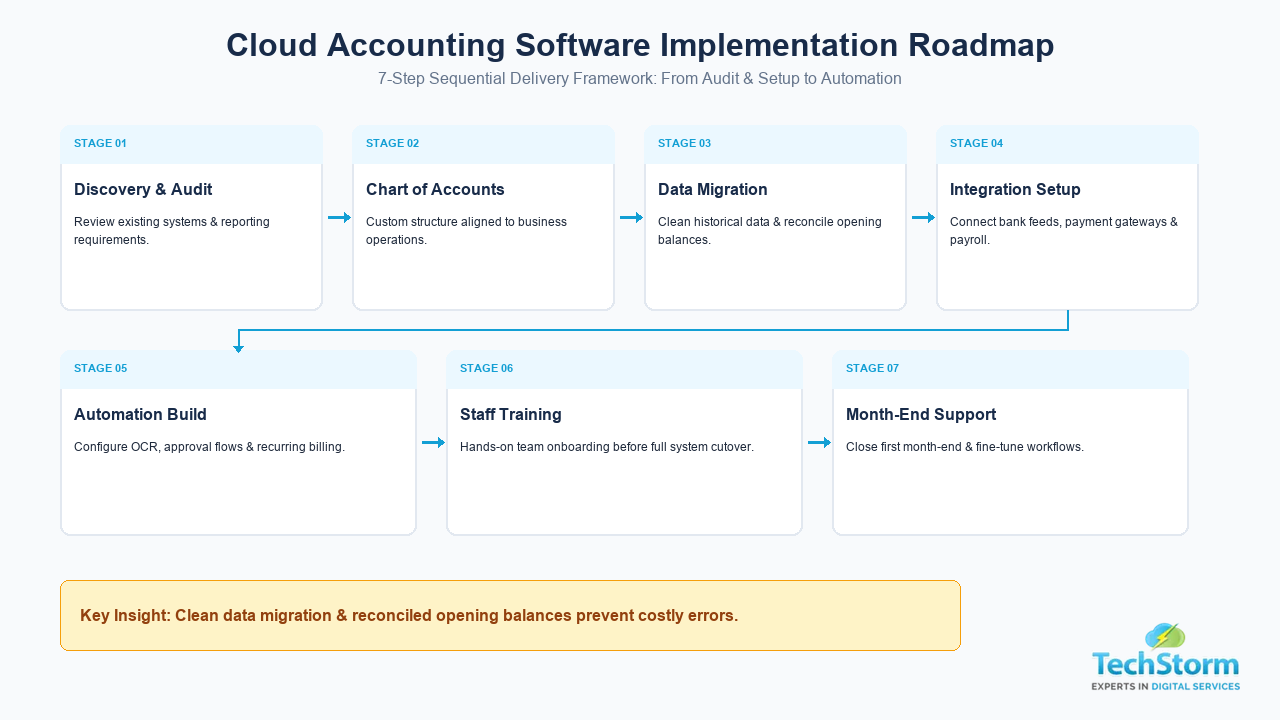
- Discovery and audit: review your current system, chart of accounts, and the reports your business actually needs.
- Chart of accounts and workflow design: structure the new system around how your business actually operates, not a generic template.
- Data migration and cleanup: move historical records across and reconcile opening balances before go-live.
- Integration setup: connect bank feeds, payroll, and any other systems that need to talk to the accounting platform.
- Automation configuration: build the rule-based workflows once the underlying data is clean and structured correctly.
- Training and go-live: walk the team through daily use before switching over fully.
- Post-launch support: check the first month-end closely to catch and fix any setup issues early.
A Practical Example: Why Automation Sequencing Matters
A pattern we see often: a business turns on automated invoice coding rules before the chart of accounts has been cleaned up, so transactions get automatically sorted into the wrong categories at scale, which is harder to unpick later than if they had never been automated at all. The fix is sequencing, get the chart of accounts and historical data correct first, then layer automation on top of a clean structure. Automating a messy process just makes the mess move faster.
Where the accounting platform needs custom connections beyond its built-in integrations, that work usually falls under our wider software development services, rather than the accounting setup itself.
How to Choose a Cloud Accounting Implementation Partner
- Ask for direct experience with your specific platform, including Aedon if that is what you are implementing.
- Ask how they handle data migration and balance reconciliation, not just new setup.
- Confirm they understand VAT and tax obligations for your market, and that they will still involve your accountant.
- Ask what training is included, and what support looks like after go-live.
- Get a clear view of which automations are included versus billed separately.
Get a Cloud Accounting Implementation Plan for Your Business
Whether you are implementing Aedon, moving off spreadsheets, or looking to automate the repetitive parts of your bookkeeping, the sequencing in this guide is what determines whether the switch actually saves time or creates new problems. Book a free consultation with our team to get a specific implementation plan and cost for your business.